
Cute AI - Immersive Chat
Shifa'ul Asqam (The Complete Diwani)Entertainment
4.62.03K Reviews
- Version
- 2.4.1
- Installs
- 500.00K
- Age Rating
- Mature 17+
Screenshots

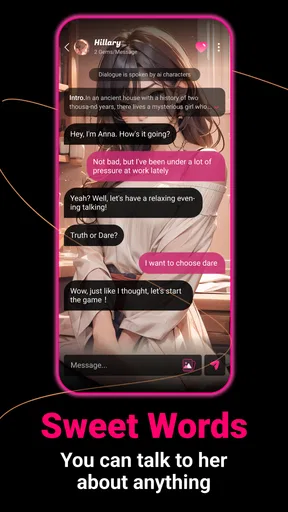
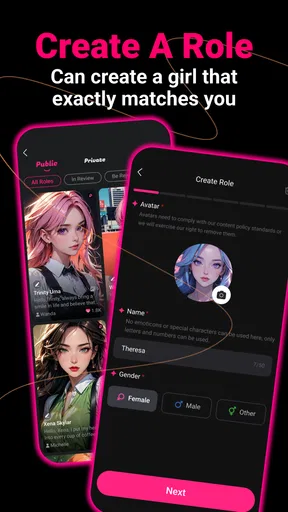

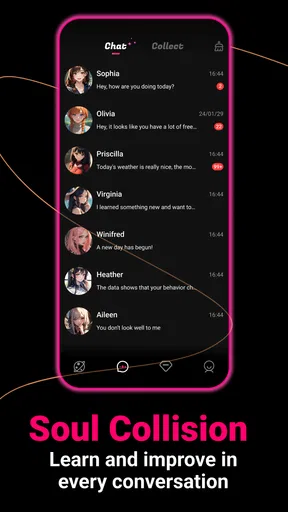

Our Review of Cute AI - Immersive Chat
 Analysis by Appyee
I approached Cute AI - Immersive Chat expecting a light entertainment app built around conversation, and that is exactly where it makes the strongest impression. Its appeal is not a complicated interface or a large collection of tools. Instead, it puts the focus on whimsical chat adventures and the feeling of spending a little time with a cute AI character. I found it easiest to enjoy when I treated each session as a short, open-ended break rather than as a serious assistant, game with a defined objective, or replacement for a real conversation.
The app comes from Shifa'ul Asqam, also presented as The Complete Diwani, and it sits in the entertainment category. It is free to start, which makes trying the basic experience straightforward, while optional purchases range from $2.99 to $49.99 per item. That pricing range is worth keeping in mind before becoming invested in longer sessions or extra content. The audience label is Mature 17+, so I would not treat the cute presentation as a signal that it is intended for children.
How the chat feels when the connection is doing its job
The central experience depends on sending messages and waiting for the app to respond. When the connection is stable, the rhythm is pleasantly simple: I open a conversation, write something imaginative or casual, and see where the exchange goes. This makes the app feel more like an interactive entertainment companion than a conventional messaging tool. There is no need to learn a complicated control scheme, and the low barrier to entry is one of its best qualities.
The whimsical angle matters because ordinary questions are not always the most rewarding way to use it. I had a better time when I gave the conversation a small premise, such as asking the character to react to an unusual situation, continue a playful scenario, or help me improvise a fictional exchange. A vague “what can you do?” tends to produce a less memorable start than a prompt with a little personality. The best results come from treating each message as a scene starter, not just a question.
That style also explains why the network connection shapes the experience so noticeably. A delayed reply interrupts the sense of back-and-forth, especially when I am following a story or trying to maintain a particular mood. In a normal chat app, a pause may simply mean the other person is busy. Here, it feels more like the scene has stopped loading. Short sessions are therefore more enjoyable when I have a reliable connection and enough time to let the exchange develop.
I would not choose this app for a situation where an immediate answer is essential. It is entertainment, not a dependable source for urgent information or a substitute for a productivity assistant. The conversational format can be relaxing, but it is also unpredictable. A response may take the interaction in an unexpected direction, and that is part of the charm for some users and a source of frustration for others.
Why prompts make a bigger difference than expected
One practical technique I found useful was to establish the tone at the beginning of a session. Saying that I wanted a silly, dramatic, mysterious, or comforting exchange gave the conversation a clearer identity than sending disconnected questions. I also got more coherent interactions by changing one detail at a time instead of rewriting the entire scenario in every message.
Another useful habit is to keep a session focused. If I jumped from role-play to advice to random trivia, the experience became less immersive. When I stayed with one idea for several turns, the app felt more like a small interactive story. This is a non-obvious strength: the entertainment value is not only in the generated replies, but in how much creative direction I bring to the exchange.
On the other hand, users who want a structured game loop may find the experience loose. There is no reason to assume that every chat will have a clear ending, a score, or a satisfying conclusion. I see it as closer to improvisation than to a traditional mobile game. If you prefer levels, fixed challenges, or visible progress, a conventional game will probably be a better fit.
Using it in everyday mobile situations
The app suits small gaps in the day. I can imagine opening it while waiting for an appointment, taking a short break between tasks, or winding down before putting the phone away. Because the interaction starts with text rather than a demanding visual system, it is easy to enter casually. I do not need to prepare a long session in advance; a single creative prompt can be enough to make the app worthwhile.
A realistic example would be a commute with a dependable mobile connection. I might begin by asking the AI to turn an ordinary journey into a fantasy scene, then add details based on what I see around me. That gives the ride a playful structure without requiring a full game. If the signal drops between messages, however, the experience loses momentum quickly. For that reason, I would use it during a connected commute rather than relying on it as my only source of entertainment in an area where service is uncertain.
It also works well as a low-pressure creativity exercise. I used the chat format to test character ideas, invent small situations, and explore different tones without needing to write a complete story myself. The app is not a replacement for a dedicated writing tool, but it can help when I want a prompt partner that responds immediately once the connection is available. The trade-off is that the conversation may steer away from my original idea, so I need to guide it actively if I want a specific result.
Phone context affects how comfortable the experience feels. In a quiet room, I can read the replies carefully and build on them. In a noisy public place, short messages work better than elaborate role-play because I am more likely to lose the thread. I also prefer using it when I am not multitasking. Switching repeatedly between apps makes a conversational scene feel fragmented, particularly if I return after a delay and no longer remember the tone I established.
Who will enjoy it, and who should skip it
I would recommend it to adults who enjoy playful AI conversations, improvised scenarios, and entertainment that changes according to the prompt. It is especially suitable for someone who wants a casual companion for creative experiments rather than a formal tool with predictable outputs. The cute presentation may attract users who find standard chatbot interfaces too plain, although the mature age label means the app should be approached with appropriate expectations.
I would be more cautious recommending it to anyone looking for factual reliability, private journaling, professional advice, or a clearly designed game. The conversational nature can make an exchange feel personal, but that does not make every response authoritative or suitable for important decisions. I also would not suggest it to a child simply because the interface sounds friendly. The age classification deserves attention before installation.
People with limited data plans should also think about when they use it. A chat app that depends on active exchanges can become less convenient when every session requires a connection and repeated message requests. I found it sensible to reserve longer conversations for a trusted connection and use shorter prompts when mobile data matters. That is not a complaint about the concept; it is simply part of choosing the right setting for this kind of app.
What happens when the connection fails
Connectivity problems are more disruptive here than in an app that stores a library of videos, music, or offline puzzles. If a reply is delayed, the conversation cannot maintain its natural rhythm. I found that the best recovery method was to avoid repeatedly tapping or sending the same message. Instead, I would wait, check that the connection was working, and then continue with a brief reference to the last idea rather than trying to restart everything at once.
That approach helps because conversational context is easy to disturb. Sending several impatient follow-ups can make the next exchange harder to follow, while a concise continuation gives the session a clean point to resume. If the interruption is long, I would start a fresh mini-scenario instead of forcing the old one back into place. This is one of the more useful practical lessons from using the app: a short reset is often more enjoyable than trying to reconstruct a scene that has lost its momentum.
I also recommend keeping prompts reasonably clear after a pause. A message such as “continue from the last scene, but make it funnier” gives the AI a direction. A vague message may produce an answer that feels disconnected, especially if the previous exchange was interrupted. Users who expect a seamless conversation through unstable service may find this frustrating, while those willing to treat each session as a series of small episodes will adapt more easily.
The app is therefore best understood as connection-sensitive entertainment. It is not something I would open with the expectation that every moment will be available regardless of signal quality. Before starting a longer interaction, I would make sure the phone is connected and that I am not about to enter a place where service commonly disappears. That small bit of planning makes the experience noticeably smoother.
Keeping the experience comfortable on a phone
Mobile use encourages short, focused exchanges, and I think that is the healthiest way to approach it. Rather than trying to keep one conversation running all day, I prefer giving each visit a simple purpose: a funny scene, a creative prompt, or a few minutes of light interaction. This reduces the disappointment caused by interruptions and makes it easier to stop when the session has reached a natural pause.
There is also a useful distinction between immersion and dependence. The app can make a conversation feel engaging, but I would not build important emotional decisions around its replies. It belongs in the entertainment space, and keeping that boundary clear helps me enjoy the imaginative side without expecting the reliability or understanding of a close friend. That distinction is particularly important because the app’s cute style can make the interaction feel more approachable than a conventional utility.
When comparing it with usual alternatives, I see three different experiences. A standard chatbot may be better for direct questions and organized tasks. A story-driven game is stronger when I want authored characters, rules, and progression. A social messaging app is better for genuine human connection. Cute AI - Immersive Chat occupies the space between those choices: it offers responsive, playful conversation without requiring another person, but it cannot provide the certainty of a tool or the authenticity of a friend.
Version, access, and sensible expectations
The app requires Android 7.0 or later, and the current version is 2.4.1. That makes checking the operating system a sensible first step before trying it on an older device. I also noticed that the free entry point does not mean every possible part of the experience should be treated as cost-free. Optional purchases are listed from $2.99 to $49.99 per item, so I would review each purchase screen carefully and avoid tapping through quickly just because the initial download costs nothing.
Its audience is substantial enough to make the app feel established: it has passed half a million installs, with an average rating of 4.6 from roughly sixteen thousand ratings and about two thousand written reviews. Those figures suggest that the concept has found a receptive audience, but they do not remove the need to decide whether conversational entertainment suits you. Popularity is useful context; it is not a guarantee that the open-ended format will match your habits.
For a data-conscious user, my practical routine would be simple. I would use longer creative sessions on a connection I trust, keep mobile exchanges brief when conserving data, and remember that the app’s value comes from active participation rather than passive browsing. I would also decide in advance whether optional purchases are worthwhile instead of making that decision during an especially engaging conversation. The more immersive the chat becomes, the easier it is to spend impulsively.
Another point is privacy awareness. Since the app is built around conversation, I would avoid entering passwords, financial details, identifying information, or anything I would not want associated with an entertainment service. That is good practice for any AI chat experience. I can still enjoy fictional prompts and harmless everyday scenarios without turning the chat into a personal archive.
My verdict on the connected chat adventure
After spending time with it, I see Cute AI - Immersive Chat as a niche but appealing entertainment app. Its strongest quality is the freedom to create a mood and see where a playful conversation leads. It works particularly well for short creative breaks, improvised storytelling, and users who enjoy shaping an exchange through their own prompts. The cute AI concept is more enjoyable when I actively direct it, rather than waiting for the app to entertain me without input.
Its main weakness is equally clear: the experience is only as smooth as the conversation’s continuity. A weak connection, an unsuitable mobile context, or an expectation of structured gameplay can quickly expose the limits of the format. The free starting point is inviting, but the optional purchase range means I would approach upgrades deliberately. The Mature 17+ label also makes it important to consider the intended audience before sharing the app with anyone younger.
I would recommend giving it a try if you want an imaginative chat companion and have a reliable connection for the sessions you plan to start. I would skip it if your priority is offline access, authoritative answers, human interaction, or a game with defined objectives. Compared with those alternatives, this app’s value lies in the middle ground: it turns a connected phone into a small space for spontaneous, character-like conversation.
My final advice is to begin with a specific scenario, keep the first session short, and see whether the tone feels natural to you before considering any purchase. If the replies make you curious enough to continue, the app can become a pleasant creative habit. If you find the open-ended exchanges repetitive or the network interruptions too distracting, another entertainment app will probably serve you better. For the right user, though, its simplicity is exactly what makes it easy to pick up and enjoy.
Verdict
Strengths of Cute AI - Immersive Chat
- Engaging character chats create a fun, personalized experience.
- Simple interface makes conversations easy to start and manage.
- Wide range of personalities supports different conversation styles.
- Useful for casual entertainment, roleplay, and creative inspiration.
- Chat history helps you continue conversations without starting over.
Limitations of Cute AI - Immersive Chat
- Some characters or features may require in-app purchases.
- AI responses can occasionally feel repetitive or inconsistent.
- Privacy concerns may arise when sharing personal information in chats.
- The app’s value depends heavily on the quality of available characters.
- An internet connection may be required for most conversations.
Similar Picks in This Category
View All
Google Play Games
Google LLC3.9

Netflix
Netflix, Inc.4.8

YouTube Kids
Google LLC4.2

Disney+
Disney4.4

Prime Video
Amazon Mobile LLC4.7

Steam
Valve Corporation3.2
Frequently Asked Questions
What is Cute AI - Immersive Chat and what can I do with it?
Cute AI - Immersive Chat is an artificial-intelligence chat app designed for interactive conversations with virtual characters. After opening the app, users can typically select or discover different personalities, start text-based chats, and guide conversations through their messages. It is aimed at entertainment, roleplay, companionship, and creative storytelling rather than replacing professional advice or real human relationships.
Does Cute AI - Immersive Chat require an internet connection?
Yes, an active internet connection is generally required because conversations are processed through online AI services. Chat responses may not work correctly when the device is offline, and performance can depend on connection speed, server availability, and current traffic. Users should also consider mobile-data usage when chatting away from Wi-Fi, especially during long or frequent conversations.
Is Cute AI - Immersive Chat free to use?
The app may be available to download for free, but some features can be restricted behind subscriptions, in-app purchases, premium characters, or usage limits. Before starting a trial or payment, review the pricing page carefully, including renewal terms and cancellation instructions. Availability of specific plans and features may vary depending on the platform, country, and app version.
Is the content in Cute AI - Immersive Chat suitable for everyone?
Not necessarily. AI conversations can vary depending on the selected character, user prompts, and the app’s available content settings. Some interactions may include mature themes, emotionally intense roleplay, or unexpected responses. Parents should check the store age rating and device controls before allowing younger users to access the app, and users should avoid treating generated content as verified or authoritative information.
What privacy and safety precautions should I take when using the app?
Because messages may be transmitted to online systems to generate replies, avoid sharing passwords, financial details, private identification documents, precise location data, or other sensitive information. Read the app’s privacy policy to understand how chats, account details, and device information are handled. AI responses can also be inaccurate or inappropriate, so use reporting, blocking, and safety controls whenever available.
